Choosing a smart home system is less about picking a speaker than deciding how your lights, plugs, sensors, cameras, and routines will work together. Amazon Alexa and Google Home are compared because both can control common devices by voice, but they differ in compatibility, automation, and how well they fit into daily digital habits. Alexa is usually the safer choice for a varied collection of smart home products and custom routines; Google Home makes more sense when the household already uses Google services and wants straightforward voice control. Neither ecosystem is the automatic winner for every home: the better fit depends on the devices you own and the tasks you expect the system to handle.

Get movie nights delivered free with Prime
- Fast, free delivery on millions of items
- Prime Video, Amazon Music and more included
- Member-only deals all year

Echo Show 5 (newest model) – Smart display, 2× bass, clearer sound, Cloud Blue
- ✔ Display: 5.5-inch touch screen
- ✔ Camera: 2 MP with built-in shutter
- ✔ Wi-Fi: Dual-band 802.11a/b/g/n/ac

Kasa Smart Plug HS103P4 – Wi‑Fi Outlet with Touch Actuator, Works with Alexa & Google Home, 15 A, UL Certified, 4‑Pack, White
- ✔ Pack quantity: 4 plugs
- ✔ Connectivity: 2.4 GHz Wi-Fi
- ✔ Voice platforms: Amazon Alexa and Google Assistant
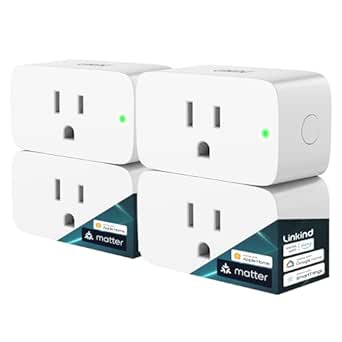
Linkind Matter Smart Plug – Works with Apple Home, Alexa, Siri, and Google Home
- ✔ Connectivity standard: Matter over 2.4 GHz Wi-Fi
- ✔ Rated amperage: 15 A
- ✔ Power capacity: 1,800 W
At a Glance
| Criteria | Amazon Alexa | Google Home | Winner |
|---|---|---|---|
| Device compatibility | Broad support across many smart home brands; check specific device compatibility before buying. | Supports many mainstream devices, with compatibility depending on product and Matter support. | A |
| Voice control and questions | Useful for commands and routines; Alexa devices and services are central to the experience. | Strong fit for Google services and natural requests; performance depends on device and software. | B |
| Automation and routines | Flexible routines, triggers, and integrations can suit more customized setups. | Supports routines and device groups, with the available options varying by device and integration. | A |
| Setup and everyday use | Familiar interface for Amazon users, though options and settings can feel spread across features. | Can feel direct for households already using Google Home and compatible Google services. | Depends |
| Privacy and account fit | Works closely with Amazon accounts and services; review device settings and available controls. | Works closely with Google accounts and services; review device settings and available controls. | Depends |
| Hardware and value | Wide range of Echo devices and price points; value depends on whether you use the ecosystem features. | Nest speakers and displays cover common needs; higher-end hardware is worthwhile when its features matter to you. | Depends |
Echo Show 5 (newest model) – Smart display, 2× bass, clearer sound, Cloud Blue
The Echo Show 5 is the most complete single-device pick here because it gives an Alexa household a visible place to check information and manage compatible smart-home devices. Its 5.5-inch touch screen makes simple controls and quick-glance content easier to access than they are on a plug controlled only through an app or voice assistant. Add video calls and media playback, and it can serve as a small bedside or kitchen hub rather than only a smart-home accessory.That breadth is why we rank it ahead of the Kasa and Linkind plugs: neither plug has a screen, camera, or built-in speaker, and each focuses on switching appliances on and off. The tradeoff is that the Echo Show 5 is much more centered on Alexa. Buyers building around Apple Home or Google Home should look first at Linkind’s Matter support, while shoppers who simply want several lamps automated will get more direct appliance coverage from Kasa’s four-pack. The built-in 2 MP camera with a shutter supports calls and home monitoring, but the resolution is modest for detailed video. Its compact screen also cannot replace a larger display for extended viewing.For a small smart-home command point, this is the strongest all-rounder in the group. Its recycled polyester yarn and aluminum construction, plus recyclable packaging, are additional considerations for buyers who value material choices. We should skip it if our priority is inexpensive, distributed outlet control or if we do not want a camera-equipped Alexa device in the room.
Pros:
- 5.5-inch touch display adds a visual control point that neither smart plug provides.
- Alexa smart-home controls sit alongside news, weather, media, and video calling.
- Built-in camera has a physical privacy shutter.
- Uses recycled polyester yarn and aluminum, with fully recyclable packaging.
Cons:
- Its smart-home role is most compelling in an Alexa-centered household.
- The 2 MP camera may not capture the detail some buyers want for video calls.
Best for: Alexa households that want a compact display for smart-home controls, quick information, media, and video calls.
Not ideal for: Buyers who mainly need multiple smart outlets, prefer Apple Home or Google Home as their center, or want a higher-resolution video-call camera.
Bottom line: We recommend the Echo Show 5 when one compact Alexa display is more useful than a set of dedicated appliance switches.
“We recommend the Echo Show 5 when one compact Alexa display is more useful than a set of dedicated appliance switches.”
Kasa Smart Plug HS103P4 – Wi‑Fi Outlet with Touch Actuator, Works with Alexa & Google Home, 15 A, UL Certified, 4‑Pack, White
When the job is to automate several plug-in appliances, the Kasa HS103P4 four-pack is the most straightforward option in this lineup. We can use its plugs for compatible lamps, fans, or humidifiers, then control them through the Kasa app, Alexa, or Google Assistant. Scheduling, timers, and countdowns make it possible to set routines without replacing the appliances themselves. Since each plug connects directly to Wi-Fi, there is no separate hub to add to the setup.Compared with the single Linkind plug, Kasa gives us four outlets to work with and directly names Alexa and Google Assistant compatibility. That makes it a practical choice when we want to automate multiple rooms without building a more involved Matter setup. Linkind has an edge for households seeking Matter interoperability and offline LAN control; Kasa’s stated compatibility is simpler, but its connectivity is limited to 2.4 GHz Wi-Fi. Unlike the Echo Show 5, Kasa adds no visual interface, calls, or media features. It is a focused appliance switch, and its strength is spreading that function across more than one device.Each plug is UL certified and rated up to 15 A or 1,800 W, though shoppers should still confirm an appliance’s requirements before connecting it. The main practical drawback is physical: the plug’s dimensions may cover an adjacent outlet. We should also avoid assuming it can handle every kind of appliance simply because the rating is high. For a household wanting clear scheduling and voice control over several suitable devices, it offers the cleanest route in this group.
Pros:
- Four plugs support automation in multiple rooms or for several appliances.
- Works with Alexa and Google Assistant through voice control and the Kasa app.
- Scheduling, timers, and countdowns support recurring routines.
- No hub is required, and each plug is rated up to 15 A (1,800 W).
Cons:
- Connects only to 2.4 GHz Wi-Fi.
- The plug’s size may block an adjacent outlet.
Best for: Households that want to schedule and voice-control several compatible lamps or appliances through Alexa or Google Assistant without a hub.
Not ideal for: Buyers who need 5 GHz Wi-Fi, Matter-based platform flexibility, offline LAN control, or access to both sockets on a closely spaced outlet.
Bottom line: We would choose the Kasa pack for uncomplicated control of several compatible appliances across an Alexa or Google Assistant home.
“We would choose the Kasa pack for uncomplicated control of several compatible appliances across an Alexa or Google Assistant home.”
Linkind Matter Smart Plug – Works with Apple Home, Alexa, Siri, and Google Home
The Linkind Matter Smart Plug is the most ecosystem-conscious plug in this comparison. Matter support is designed to help compatible devices work across major smart-home platforms, including Apple Home, Alexa, Google Home, and SmartThings. For a household that already has a Matter-certified controller, that cross-platform approach can make the plug a better fit than choosing an outlet around a single assistant. Its stated offline LAN control also matters when we want local control to continue without an internet connection.Those strengths distinguish Linkind from the Kasa four-pack, which offers direct Alexa and Google Assistant compatibility but does not list Matter or offline LAN control. Kasa is the more practical route if we need several plugs and want a hub-free setup. Linkind instead makes more sense when interoperability or local operation matters more than having a multi-plug bundle. Compared with the Echo Show 5, it brings no display or camera; its purpose is to switch a connected appliance and fit into a broader platform setup.There is a real setup condition to understand: many platform integrations require a Matter-certified hub or controller. That can mean extra equipment or configuration, so the plug is not automatically the easiest choice just because Matter is supported. It also uses 2.4 GHz Wi-Fi only, like Kasa. The supplied details describe fire-resistant construction and a compact design, with a 15 A / 1,800 W capacity, but do not provide dimensions to compare precisely. We would choose it for a compatible smart home where platform flexibility and local control justify checking controller requirements first.
Pros:
- Matter support targets compatibility across Apple Home, Alexa, Google Home, SmartThings, and AiDot.
- Offline LAN control can keep local operation available without internet access.
- Supports app control, voice commands, schedules, and timers.
- Compact design and stated 15 A / 1,800 W capacity suit compatible plug-in appliances.
Cons:
- Many platform integrations require a Matter-certified hub or controller.
- Supports 2.4 GHz Wi-Fi only, with no 5 GHz compatibility.
Best for: Households with a Matter-certified controller that want a smart plug compatible with multiple ecosystems and capable of offline LAN control.
Not ideal for: Buyers without a compatible controller who want the easiest possible setup, need 5 GHz Wi-Fi, or need several plugs in one purchase.
Bottom line: We recommend Linkind when Matter interoperability and offline local control matter more than a hub-free, multi-plug setup.
“We recommend Linkind when Matter interoperability and offline local control matter more than a hub-free, multi-plug setup.”
As an Amazon Associate we earn from qualifying purchases.
Key Differences
The clearest practical difference is how much choice each ecosystem gives you when assembling a mixed-brand smart home. Alexa has broad third-party support and a mature routine system, which can matter if you want devices from different makers to cooperate or want automations tied to specific triggers. Google Home also supports a wide selection of products, but device-by-device compatibility and the exact controls available can matter more than the brand name on the box. In either case, check support for your particular devices and features before committing.
Google Home’s advantage is fit for people who already use Google services and want voice requests to sit naturally alongside them. Alexa has a stronger case for households that prioritize product choice and custom routines. The gap narrows for a simple setup of a few lights and plugs: either system can handle basic voice commands, and the user’s preferred account and devices may matter more than a general platform ranking.
Cost is also about the ecosystem rather than just the first speaker. Both offer entry-level hardware and more capable devices, but adding products can tie more of your home to one platform. Paying extra is worthwhile only when a particular speaker, display, sensor, or feature serves a real need. A more expensive device does not automatically improve compatibility or voice control across the whole home.
Detailed Comparison
Device compatibility (Amazon Alexa wins — moderate)
Alexa wins by a moderate margin for buyers building around a broad mix of smart home brands. Its wide device support can make it easier to find products that work with the system. Google Home supports many mainstream devices too, so the gap may be minor in a home centered on a few popular products. Check compatibility for the exact functions you need, not just basic connection.
Voice control and questions (Google Home wins — moderate)
Google Home wins by a moderate margin for households that use Google services and want voice interaction connected to them. Alexa remains capable for common commands and works naturally with Amazon’s services. For turning lights on or adjusting a thermostat, the difference is often minor; for requests that depend on service preferences, choose the system that already fits your accounts and habits.
Automation and routines (Amazon Alexa wins — moderate)
Alexa wins by a moderate margin when the goal is to build flexible routines around multiple devices and triggers. Google Home can handle useful automations, particularly for common household tasks, but the available choices can depend on the device and integration. For a simple bedtime routine, both may be enough; for a more customized setup, Alexa is the stronger starting point.
Setup and everyday use (minor difference)
This depends on the household’s existing devices and accounts. Google Home may feel more direct if the family already uses Google services and Nest products. Alexa may be simpler for people who already have Echo devices or shop through Amazon. The gap is minor for basic voice control, but can become moderate if household members need to learn a new app or maintain a system that does not match their usual accounts.
Privacy and account fit (moderate difference)
Neither has a universal advantage on privacy from platform choice alone. Both connect smart home activity to an account and offer settings that users should review, including voice and device controls. The difference is moderate for someone who prefers to keep more services within one company’s account system, but the right choice depends on which company’s controls and policies the household is comfortable using. Check current settings before enabling microphones, cameras, or activity storage.
Hardware and value (minor difference)
There is no fixed winner on value. Both platforms sell devices across different needs and budgets, and a low-cost speaker may be sufficient for voice control while a display or higher-end speaker serves a different purpose. The difference is minor when comparing entry-level control for lights or plugs. It becomes moderate if you need a screen, better audio, or a device that can act as a hub. Pay more only for a capability you will use.
Amazon Alexa: Pros and Cons
Pros:
- Broad compatibility across many smart home products.
- Flexible routines suit households with customized automation needs.
- Echo hardware comes in a range of device types and price points.
Cons:
- Feature choices and settings can take time to learn.
- Some integrations or features may depend on particular devices or services.
- Best value comes from using the ecosystem, which may add account and platform commitment.
Google Home: Pros and Cons
Pros:
- Natural fit for households already using Google services.
- Straightforward for common voice commands and everyday smart home tasks.
- Nest hardware covers common speaker and display needs.
Cons:
- Compatibility and available controls still need checking product by product.
- Some advanced automation needs may be better served by Alexa’s flexibility.
- Higher-priced hardware is worthwhile only when its specific features are useful.
Who Should Choose What
Choose Amazon Alexa if:
- You want the widest practical choice of devices from different smart home brands.
- You expect to build custom routines or connect several types of devices.
- Your household already uses Echo devices or Amazon services.
Choose Google Home if:
- Your household already relies on Google services and wants that account fit.
- Your main needs are everyday voice commands and straightforward control.
- You prefer Nest hardware or already have compatible Google Home devices.
Skip both if: Skip both if your essential devices do not support either platform’s required features, or if you want a local-first system with tighter control over cloud services and account dependence.
Value for Money
For most buyers, value comes from buying the least expensive device that handles the intended job and checking that it works with the devices already in the home. Alexa can offer better platform value when broad compatibility or elaborate routines would otherwise require workarounds. Google Home can be better value for someone already invested in Google services, since familiar accounts and devices reduce friction. Paying more for a premium speaker or display is justified when audio quality, a screen, or hub functions matter to daily use; it is poor value if all you need is a voice command for a lamp.
Final Verdict
Choose Amazon Alexa if you are building a varied smart home, want more room to customize routines, or need broad product choice. Choose Google Home if Google services already anchor your household and you want convenient voice control for common tasks. For a simple setup of lights, plugs, and a speaker, either can work, so buy around confirmed device compatibility and the accounts you prefer. The biggest deciding factor is the system’s fit with your existing devices and services; Alexa is the stronger default for flexibility, while Google Home is the clearer fit for Google-centered households.
Frequently Asked Questions
Can Alexa and Google Home control the same smart devices?
Many popular devices support both, but support varies by product and feature. Check the device maker’s compatibility details for the specific actions you need, such as dimming, camera viewing, or sensor-based routines.
Which is better for a beginner?
Either can work for a small setup. Choose the one that matches the accounts and devices you already use; that usually makes setup and daily control more straightforward. Start with a few compatible products before adding more.
Is Alexa better for automation?
Alexa is generally the stronger option for buyers who want flexible routines and a wide range of integrations. Google Home can still handle common automations, so compare the exact triggers and actions your planned routine requires.
Is it worth paying more for a smart display?
Pay more if you will use the screen for video calls, camera views, timers, or visual controls. If you mainly want to switch devices by voice, a basic compatible speaker or hub may be better value.