TL;DR

Get movie-night favorites delivered free — and shop member deals
- Fast, free delivery on millions of items
- Access to Prime Big Deal Days deals on October 6–7
- Prime Video, Amazon Music and more included
Buying a prebuilt AI workstation saves time, offers validated thermals, and includes support — often at a price premium. Building your own gives control and customization but demands time, skill, and troubleshooting. In 2026, the best choice depends on your workload, budget, and patience.
Imagine this: your AI project is ready, data is flowing, and you need a powerful machine—fast. Do you build it yourself, pulling all the levers for cooling, power, and noise? Or do you buy a prebuilt, letting someone else handle the complicated bits? The landscape has shifted dramatically in 2026, turning this question from simple cost-saving to a complex tradeoff involving time, risk, and performance. Whether you’re a solo researcher, a startup, or a professional enterprise, this decision shapes your AI journey—so let’s break down what really matters.
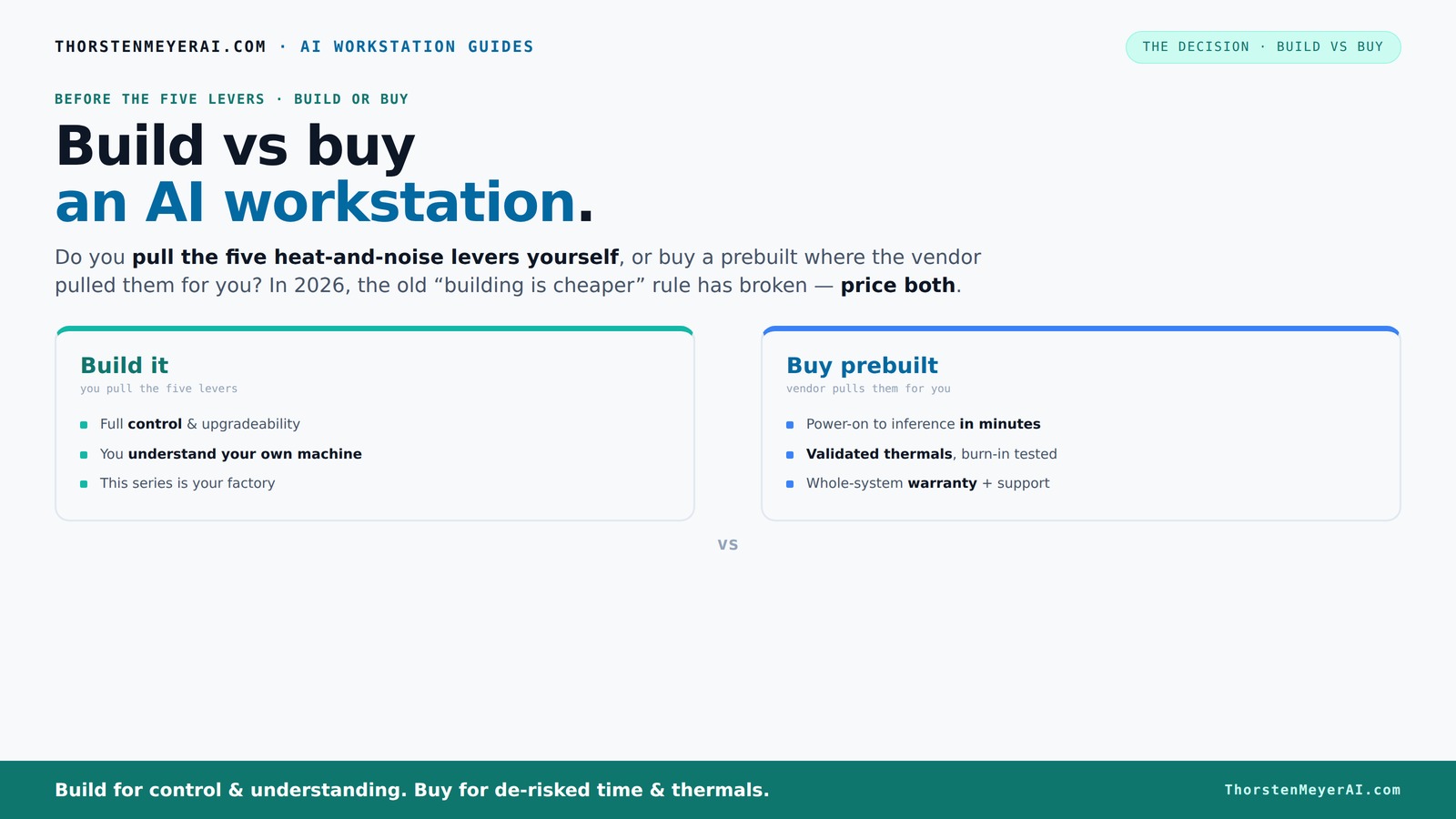
Build vs buy
an AI workstation.
The real question behind this whole series: do you pull the five heat-and-noise levers yourself, or buy a prebuilt where the vendor pulled them for you? And in 2026, the old “building is cheaper” rule has broken. Match your situation in Part 3.
Key Takeaways
- In 2026, component shortages and bulk-buying have made prebuilt workstations often as affordable or even cheaper than DIY builds.
- Prebuilts offer validated thermals, professional testing, and support, reducing setup time and risk.
- Building your own system provides maximum control over components and customization but requires time, expertise, and troubleshooting skills.
- The choice depends on your workload, budget, technical skill, and how much risk you're willing to accept.
- Always compare real-time prices and consider future upgradeability before deciding.
As an affiliate, we earn on qualifying purchases.
What AI Workloads Actually Need From a Workstation
AI workloads are like a high-performance engine—demanding and precise. Building your own AI workstation can give you control over hardware choices. Training large language models (LLMs) gobble up VRAM, requiring at least 24GB of GPU memory for full-sized models. Inference, while less intense, still benefits from fast SSDs and ample RAM. Think of it as a race car: horsepower (GPU), cooling, and stability matter.
For example, training a GPT-3-sized model needs a GPU like the RTX 4090 or A100 with 24–80GB VRAM, paired with 128GB of RAM and NVMe SSDs for quick data access. Fine-tuning models or running inference on smaller models can get by with less, but the core takeaway is: your workload defines what hardware is critical.
Understanding these needs is vital because it influences your hardware choices and investment. For instance, underestimating VRAM can bottleneck training, forcing you to scale down models or accept longer training times. Conversely, overspending on excessively high-end hardware for lighter workloads can be a waste, draining your budget without proportional gains. The key is balancing your workload demands with budget constraints, recognizing that some hardware choices have tradeoffs—more VRAM and compute power mean higher costs and power consumption, but they also enable more ambitious AI projects without hardware upgrades.
As an affiliate, we earn on qualifying purchases.
Why People Buy Prebuilt Systems — Faster, Safer, Simpler
Prebuilt AI workstations are like a ready-to-run sports car—test-driven and tuned for performance. Learn about AI tools for content creation to understand how prebuilt systems can streamline workflows. They arrive with validated thermals, optimized cooling, and often water-cooled options, reducing your setup time and guesswork. For instance, vendors like Lambda or BIZON test every system under heavy load, so you’re confident it won’t throttle or overheat during intense training sessions.
Most buyers opt for prebuilts because they save valuable time. You get a machine with the OS, drivers, and AI frameworks installed—ready to deploy. Support matters, too. If something goes wrong, you call a single vendor, not troubleshoot a pile of parts.
Moreover, these vendors often incorporate advanced cooling solutions, like custom water loops or high-performance fans, that are difficult to replicate on your own. This not only ensures thermal stability—keeping your hardware safe during extended workloads—but also maintains consistent performance without thermal throttling. The convenience of a pre-validated system means fewer surprises, which is crucial when your AI training or inference tasks are time-sensitive and costly.
As an affiliate, we earn on qualifying purchases.
Why Building Your Own System Still Makes Sense — Control, Customization, Cost
Building your own AI workstation is like crafting a bespoke suit—perfectly fitted to your needs. Build vs buy a prebuilt AI workstation is a key decision in customizing your setup. You pick each component, from the motherboard to the GPU, ensuring compatibility and performance. If you need a specific GPU like the RTX 4090 or a large 256GB RAM setup, building lets you tailor everything.
Beyond customization, building your own system grants you control over quality and future upgrades. For example, choosing a high-quality power supply with an 80 Plus Platinum rating not only improves efficiency but also ensures stable power delivery—crucial during intense training sessions. Selecting a case with sound-dampening panels and a quiet CPU cooler can significantly reduce noise, creating a more comfortable working environment. Additionally, fine-tuning fan curves and undervolting components can optimize thermals and power consumption, extending hardware lifespan and reducing operational costs over time.
Cost-wise, sourcing individual parts often results in lower expenses compared to prebuilt systems, especially when you already own tools or can assemble the system yourself. This approach allows you to avoid unnecessary features you don’t need, focusing your budget on high-impact components. However, it requires time, patience, and technical knowledge—mistakes in compatibility or assembly can lead to delays or hardware issues. Overall, for those who value control and have the skills, building provides a tailored, potentially more cost-effective solution that can evolve with your needs and push hardware limits without proprietary restrictions.
As an affiliate, we earn on qualifying purchases.
Hidden Costs and Risks on Both Sides
Both paths come with their own set of surprises. Understanding the tradeoffs in AI workstation choices helps mitigate hidden costs. Buying prebuilt may seem straightforward, but beware of proprietary parts, limited upgrade options, or lower-quality PSUs. A common issue is the vendor substituting cheaper components without notice, which can impact reliability. These hidden tradeoffs can result in reduced lifespan or unexpected failures, especially under sustained high loads typical in AI workloads.
Building your own system sounds cheaper, but compatibility mistakes, troubleshooting, and assembly time add up. A misconfigured BIOS or incompatible RAM can delay your project by days, and tracking down obscure issues can be frustrating. Fragmented warranties, where each component has its own coverage, complicate repairs and can lead to higher costs if multiple parts fail simultaneously. Furthermore, unforeseen costs—such as purchasing additional tools, thermal paste, or replacement parts—can inflate your budget beyond initial estimates. Both options demand careful planning: prebuilt systems require scrutinizing vendor quality and parts, while DIY builds need thorough compatibility checks and troubleshooting skills. Recognizing these hidden costs and risks helps you make more informed, resilient choices.
Which Choice Fits Your Profile — Solo Hobbyist or Enterprise Powerhouse?
Your decision depends on your needs. Whether you're a hobbyist or enterprise user, choosing the right system is crucial. Solo creators or students with time and curiosity might prefer building, enjoying the process and saving money. They can customize for silence, specific GPU models, or extra storage, and learn along the way. This route fosters a deeper understanding of hardware, which can be invaluable for troubleshooting and future upgrades, but it also requires patience and technical skill.
On the other hand, startups, ML teams, or enterprise users often prioritize reliability, support, and quick deployment. For them, a prebuilt offers peace of mind—validated thermals, professional support, and a warranty that covers hardware failures during critical training runs. This ensures minimal downtime and allows teams to focus on their AI projects rather than hardware issues. The choice hinges on your technical expertise, urgency, and risk tolerance. If time and reliability are paramount, prebuilts tend to be safer; if you enjoy tinkering and want maximum customization, building is more appealing.
Buying Checklist: How to Pick the Right AI Workstation
When shopping, focus on these essentials:
- GPU VRAM: Aim for at least 24GB for large models.
- RAM: 64GB or more for training; 32GB for inference.
- Power Supply: 80 Plus Platinum-rated for efficiency and headroom.
- Cooling: Noise-optimized solutions—liquid cooling or high-quality fans.
- Storage: NVMe SSDs for fast data access.
And don’t forget support and upgrade paths. Prebuilts often include validated configurations, but check for proprietary parts or limited upgradeability. Building your own? Verify compatibility with tools like PCPartPicker or consult online communities for build guides. Recognizing the importance of future-proofing means considering upgradeability options now, as well as support services that can help troubleshoot or replace parts quickly—saving time and preventing costly downtime in the future.
Frequently Asked Questions
Is it cheaper to build or buy an AI workstation in 2026?
In 2026, component shortages and bulk purchasing have made prebuilts often as affordable or even cheaper than DIY builds. Always compare prices for your specific configuration, as the market fluctuates rapidly.Which option provides better AI performance for the money?
Performance depends on your choices. Prebuilts are validated for thermal and power efficiency, often offering optimized multi-GPU setups. Building allows precise component selection, but requires expertise to match performance levels.How much does the convenience of a prebuilt system cost?
Prebuilts typically carry a markup for assembly, validation, and support. This can range from 10–20% over parts alone, but saves you hours of troubleshooting and setup time.Are prebuilts using lower-quality parts like PSUs or motherboards?
It varies. Reputable vendors use high-quality components, but some cheaper options may include proprietary or lower-tier parts. Always check the specifications before purchasing.Can I upgrade a prebuilt later?
It depends. Some prebuilts have proprietary parts or limited space, which can restrict upgrades. Confirm upgrade paths and compatibility before buying.Conclusion
If you want a machine that just works and comes with support, a prebuilt is your safest bet. But if you crave control, customization, and enjoy the building process, DIY remains compelling—especially when component prices align.
Either way, remember this: today’s market makes the choice more about your workflow than just saving a few bucks. Your perfect AI workstation isn’t just built or bought—it’s made to fit the story you’re about to tell with AI.
Fall Picks
fall essentials
As an affiliate, we earn on qualifying purchases.